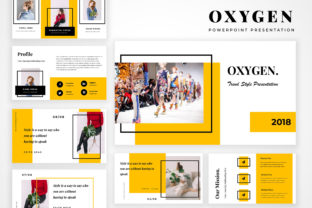
Oxygen Powerpoint Presentation: A Modern and Stylish Way to Showcase Your Ideas
Oxygen Powerpoint Presentation is a professional and versatile tool designed for creators, designers, students, lecturers, and business professionals who want to present their projects or creative ideas in an engaging and modern way. This presentation offers a clean, minimalistic design that allows users to focus on content while maintaining a visually appealing layout. Whether you're preparing a business pitch, a student project, or a portfolio showcase, Oxygen Powerpoint Presentation provides the structure and flexibility needed to make your ideas stand out.
What Is Oxygen Powerpoint Presentation?
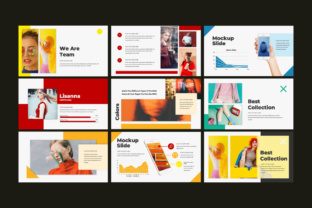
Oxygen Powerpoint Presentation is a digital template that simplifies the process of creating presentations. It is built with a modern aesthetic, making it ideal for those who want to convey information clearly and professionally. The presentation includes a variety of slides tailored for different purposes, such as introducing a team, sharing a quote, outlining a timeline, or presenting services and mission statements. Its design is both stylish and functional, ensuring that your message is delivered effectively without unnecessary distractions.
The presentation is compatible with both .PPT and .PPTX formats, making it accessible across different platforms and software. Users can easily edit the slides using standard PowerPoint tools, eliminating the need for additional software. This makes it a practical choice for individuals who may not have access to advanced design programs but still want to create high-quality presentations.
Key Features of Oxygen Powerpoint Presentation
Oxygen Powerpoint Presentation comes with a range of features that enhance its usability and visual appeal. Here are some of the most notable aspects:
- 50 Unique Custom Slides: The template includes a wide variety of slide types, covering topics like about, team, quote, timeline, services, vision, and mission. This ensures that you have the right slide for every part of your presentation.
- Resizable and Editable Graphics: All graphics in the presentation are scalable without losing quality, allowing for easy customization. You can adjust shapes, icons, and images to fit your specific needs.
- Vector Icons Included: The use of vector icons ensures that your visuals remain sharp and clear at any size. These icons can be easily edited or replaced to match your brand or theme.
- Edit Charts and Graphs Using Tables: Creating data-driven presentations is straightforward with this feature. You can input your data into tables and generate charts directly within the presentation.
- 16:9 HD Widescreen Format: The presentation is designed for high-definition displays, ensuring that your content looks great on any screen.
- Smooth Animations: Subtle animations add a dynamic element to your slides, helping to maintain audience engagement without being overwhelming.
- Drag-and-Drop Editing: The intuitive interface allows for easy rearrangement of elements, making the editing process more efficient and user-friendly.
Who Can Benefit From Oxygen Powerpoint Presentation?
Oxygen Powerpoint Presentation is suitable for a wide range of users, including:
- Creators and Designers: Artists, graphic designers, and multimedia creators can use this template to showcase their portfolios and creative work in a professional manner.
- Students and Lecturers: Educators and students can benefit from the structured layout and customizable slides when presenting research, assignments, or class projects.
- Business Professionals: Entrepreneurs, marketers, and business owners can use Oxygen Powerpoint Presentation to deliver compelling pitches, business plans, or marketing strategies.
- Freelancers and Consultants: Independent professionals can leverage this tool to present their services, case studies, and client testimonials in a polished format.
Its simplicity and versatility make it a valuable resource for anyone looking to communicate their ideas effectively through visual storytelling.
Real-World Applications of Oxygen Powerpoint Presentation
Oxygen Powerpoint Presentation can be used in various scenarios, depending on the user's needs. For example:
- Portfolio Presentations: Designers and artists can use the template to create a visually striking portfolio that highlights their best work. The clean layout ensures that the focus remains on the artwork or designs.
- Business Proposals: Entrepreneurs can use the presentation to outline their business ideas, goals, and strategies. The timeline and mission slide templates help in structuring the proposal logically.
- Academic Presentations: Students and educators can use the slides to present research findings, case studies, or classroom projects. The editable charts and graphs allow for clear data representation.
- Client Meetings: Sales professionals can use the presentation to introduce their services, showcase past projects, and explain their value proposition to potential clients.
In each of these scenarios, Oxygen Powerpoint Presentation provides a reliable and aesthetically pleasing platform for communication.
Strengths and Considerations
Oxygen Powerpoint Presentation has several strengths that make it a popular choice among users. Its ease of use, combined with a modern design, ensures that even those with limited design experience can create impressive presentations. The availability of vector graphics and editable elements adds to its flexibility, allowing for personalized customization.
However, there are a few considerations to keep in mind. While the template is highly customizable, users who are unfamiliar with PowerPoint may need some time to learn how to fully utilize all the features. Additionally, since the design is minimalistic, it may not suit users who prefer more elaborate or colorful themes.
Despite these limitations, Oxygen Powerpoint Presentation remains a strong option for those looking for a professional yet simple solution to their presentation needs.
How to Evaluate Suitability for Your Needs
When deciding whether Oxygen Powerpoint Presentation is the right choice for your project, consider the following factors:
- Project Type: If your presentation requires a clean, modern look, this template is an excellent fit. However, if you need a more complex or highly customized design, you may need to explore other options.
- Technical Skills: The template is user-friendly, but if you're not familiar with PowerPoint, you may need to spend some time learning how to navigate the features effectively.
- Customization Needs: While the template offers a high degree of customization, it may not support advanced design elements that require specialized software.
- Time Constraints: If you're working under a tight deadline, the ease of use and drag-and-drop functionality of Oxygen Powerpoint Presentation can save you time compared to building a presentation from scratch.
By assessing these factors, you can determine whether Oxygen Powerpoint Presentation aligns with your specific requirements and goals.
Conclusion
Oxygen Powerpoint Presentation is a powerful tool for anyone looking to create professional and visually appealing presentations. With its modern design, customizable features, and user-friendly interface, it caters to a wide range of users, from students to business professionals. Whether you're showcasing your portfolio, delivering a business pitch, or presenting academic work, this template offers the flexibility and functionality needed to make your ideas shine. By understanding its strengths and limitations, you can make an informed decision about whether it's the right choice for your next project.