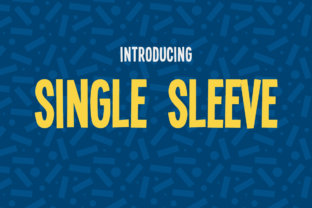
Single Sleeve: A Bold, Bouncy Font for Creative Expression
Single Sleeve is a unique sans serif font that brings energy and personality to any design project. Created by typographer Vic Fieger, this free font has gained popularity among designers, marketers, and creators who want to add a dynamic touch to their work. Its playful curves and distinctive shapes make it ideal for headings, logos, and branding materials. However, while its style is undeniably appealing, there are important considerations to keep in mind when using Single Sleeve effectively.
What Makes Single Sleeve Stand Out?
Single Sleeve is more than just a font—it's a visual statement. Its bouncy, almost whimsical appearance sets it apart from more traditional typefaces. The font’s asymmetrical structure and exaggerated strokes give it a sense of movement, making it perfect for projects that require a fresh, modern look. Whether you're designing a website, creating social media graphics, or working on a brand identity, Single Sleeve can help your work stand out.
One of the reasons people gravitate toward Single Sleeve is its versatility. While it’s not suitable for long blocks of text, it shines in short, impactful phrases. Its boldness makes it ideal for headlines, titles, and callout elements. Additionally, because it’s available for free, many users find it an attractive option for personal or small business projects without the need for a premium license.
Common Mistakes When Using Single Sleeve
Despite its appeal, some users make mistakes when incorporating Single Sleeve into their designs. One common error is overusing the font. While it’s tempting to apply it everywhere, doing so can lead to visual clutter and reduce readability. Single Sleeve works best when used sparingly, allowing its personality to shine without overwhelming the overall composition.
Another mistake is ignoring the font’s limitations. Because it’s a display font, it may not render well at smaller sizes or in certain contexts. For example, using it for body text can make reading difficult, especially for those with visual impairments. Always test the font in different sizes and settings before finalizing your design.
Choosing the Right Context for Single Sleeve
Before using Single Sleeve, consider the context of your project. Is it for a professional logo, a creative poster, or a casual blog header? The font’s tone may not align with all types of content. For instance, a formal business report would likely benefit from a more traditional font, while a music festival flyer could be enhanced by Single Sleeve’s energetic vibe.
It’s also important to check the font’s licensing terms. While it’s free to download, some restrictions may apply. Make sure you understand how you can use the font—whether for personal, commercial, or non-commercial purposes. Misusing the font could lead to legal issues or damage your reputation if you’re unaware of the rules.
How to Avoid Common Pitfalls
To get the most out of Single Sleeve, start by understanding its strengths and limitations. Use it as a focal point rather than a background element. Pair it with simpler fonts for balance, and avoid combining it with other highly stylized typefaces that might clash.
Testing is key. Before finalizing any design, preview the font in different environments. Check how it looks on screens, printed materials, and various devices. This ensures consistency and helps you spot any potential issues early on.
Practical Tips for Better Results
Here are a few practical tips to help you use Single Sleeve more effectively:
- Limit usage: Apply the font to a single headline or title rather than multiple elements.
- Pair with complementary fonts: Combine it with a clean, neutral font to create contrast and improve readability.
- Adjust spacing: Experiment with letter and line spacing to enhance legibility, especially at smaller sizes.
- Check accessibility: Ensure the font is easy to read for all users, including those with visual impairments.
- Respect licensing: Review the font’s terms of use to avoid any legal complications.
Real-World Examples of Effective Use
Many designers have successfully incorporated Single Sleeve into their work by following these guidelines. For example, a local music venue used the font for its event posters, pairing it with a simple sans serif for the body text. The result was a visually striking design that captured attention without sacrificing clarity.
Another example comes from a small business owner who used Single Sleeve for a product launch. By limiting its use to the main headline and ensuring proper spacing, the design felt modern and professional while maintaining a friendly, approachable tone.
Final Thoughts on Using Single Sleeve
Single Sleeve is a powerful tool for adding style and character to your designs. However, like any font, it requires thoughtful application to achieve the best results. By understanding its strengths, avoiding common mistakes, and testing your work thoroughly, you can harness the full potential of this unique typeface.
Whether you're a designer, marketer, or hobbyist, taking the time to learn how to use Single Sleeve properly can elevate your work and help you communicate more effectively. With the right approach, this bold, bouncy font can become a valuable asset in your creative toolkit.